 OSINT: How to Find Anything About Anyone (Without Being a Hacker)
OSINT: How to Find Anything About Anyone (Without Being a Hacker)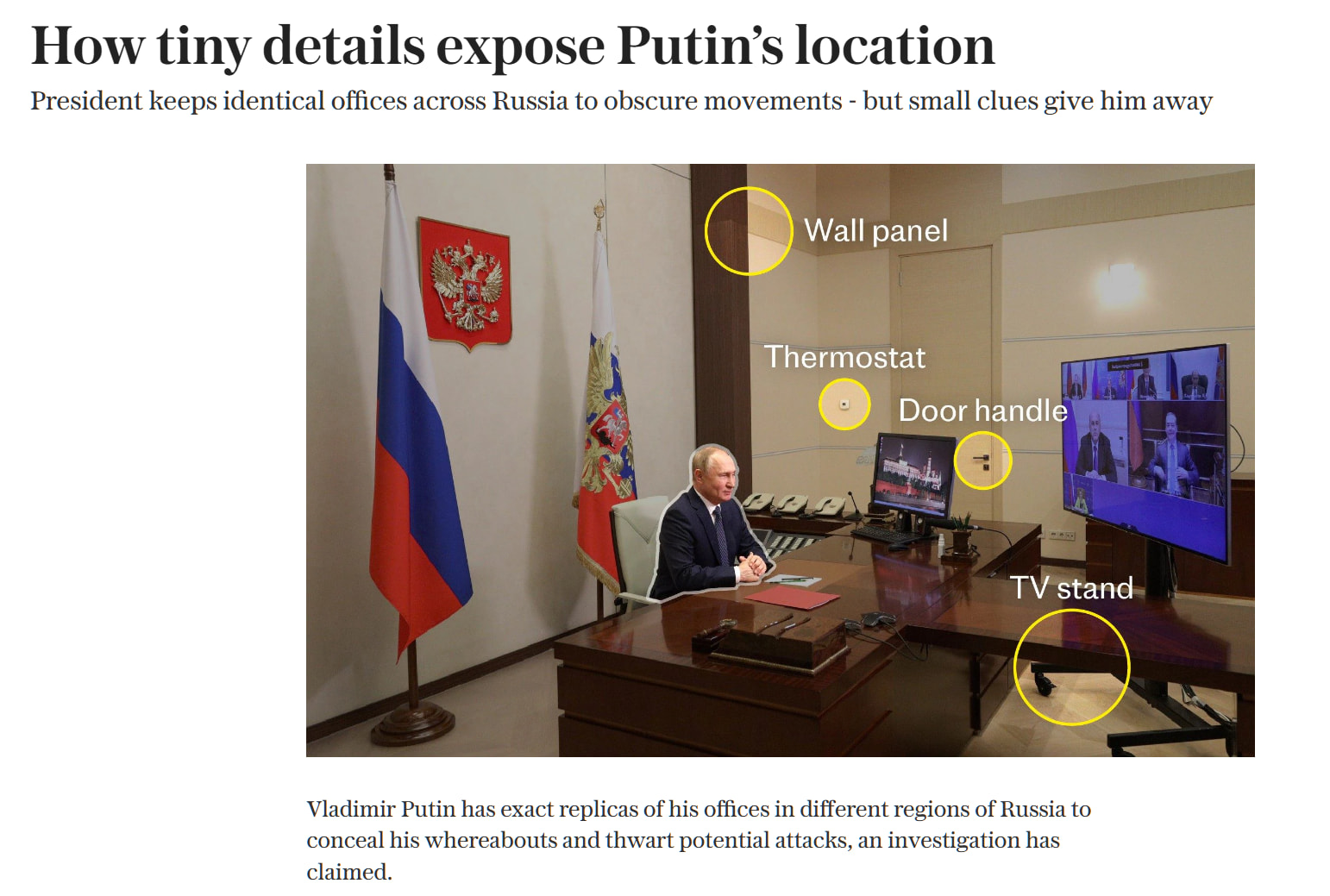
Source: telegraph.co.uk/world-news/2025/11/13/spot-difference-putin-replica-offices-exposed/
You know that feeling when someone finds your address from a selfie? Or tracks down a scammer using just their username? That’s OSINT. And no, you don’t need to be some basement-dwelling genius to do it.
OSINT stands for Open Source Intelligence. Fancy words for: finding shit that’s technically public but nobody knows how to find.
This isn’t hacking. This isn’t illegal. This is just… knowing where to look.
And holy shit, once you learn this stuff, the internet will never feel the same again.
🤔 Why Should You Even Care? (Click This First)
Because knowledge is power. And right now, most people are walking around blind while their entire life is scattered across the internet like digital breadcrumbs.
Real uses for normal people:
- Checking if that “crypto investor” sliding into your DMs is actually a Nigerian scam farm
- Finding out if your landlord has 47 lawsuits against them
- Tracking down the asshole who stole your bike (yes, really)
- Verifying if that “news” your uncle shared is complete bullshit
- Finding out where a photo was actually taken
- Checking if your email got leaked in a data breach
- Reverse searching that “too good to be true” profile pic
This isn’t about being creepy. It’s about not being a victim in a world where everyone else already knows how to find this stuff.
Part 1: Image Investigation
📸 Why Your Selfies Betray You
Every Photo Tells a Story (Whether You Want It To)
That innocent photo you posted? It might contain:
- GPS coordinates of exactly where you were standing
- The exact time and date
- What camera/phone you used
- Sometimes even your name if you edited it in certain apps
How to check what your photos are leaking:
Go to https://exif.tools or https://jimpl.com — drag any image in and watch in horror as it spills all its secrets.
Want to see this in action? Download any photo from your phone, upload it there, and prepare to feel very uncomfortable.
🔎 Reverse Image Search — The Right Way
Finding Where a Photo Was Taken
Someone sent you a sketchy photo? Or you’re trying to verify if that “beachfront property” is actually real?
The lazy way (works 70% of the time):
- Go to https://images.google.com (click the camera icon)
- Upload the image
- See where else it appears
The better way:
Google’s reverse search sucks now. Use these instead:
| Tool | URL | What It’s Good For |
|---|---|---|
| TinEye | https://tineye.com | Finding the OLDEST version of an image (catches catfish fast) |
| Yandex | https://yandex.com/images | Scary good at faces. Like, too good. |
| Bing Visual | https://www.bing.com/visualsearch | Sometimes finds stuff Google misses |
| Sogou | https://pic.sogou.com | Chinese internet - whole different world |
Pro tip: Run the same image through ALL of them. Seriously. Each one searches different corners of the internet.
🤖 AI Geolocation — This Is Getting Scary
AI Can Now Guess Where Photos Were Taken
This is new and terrifying.
GeoSpy (https://geospy.ai) and Picarta (https://picarta.ai) use AI to look at a photo and guess the location. No GPS needed. It analyzes the architecture, vegetation, road signs, everything.
It’s not perfect, but it’s scary accurate sometimes. Try it on a random street photo and watch it pinpoint the country, sometimes even the city.
🌅 Shadow Analysis — Yes, This Is Real
That Shadow in Your Photo? It’s a Timestamp.
Not a joke. Investigators use shadow length and direction to figure out what TIME a photo was taken.
SunCalc (https://suncalc.org) lets you:
- Pick a location
- Pick a date
- See exactly where the sun would be at any time
Match that with the shadows in a photo = you know when it was taken.
This is how journalists caught world leaders lying about their whereabouts. Shadow angles don’t lie.
🎭 Detecting Fake/Edited Photos
Someone swears a photo is real? Test it.
FotoForensics (https://fotoforensics.com) — Upload any image and it runs something called “Error Level Analysis.” Basically, edited areas show up different than original areas.
Forensically (https://29a.ch/photo-forensics/) — Browser-based. Does the same thing plus clone detection (finds copy-pasted areas).
Not foolproof, but catches 80% of lazy Photoshop jobs.
Part 2: Finding People Online
👤 The Username Game — One Name, Many Accounts
Here’s a fun fact: Most people use the same username everywhere.
That means if you find someone’s Reddit username, you might also find their:
- Gaming profiles
- Old forum accounts from 2009 where they said embarrassing shit
Tools that check hundreds of sites at once:
- WhatsMyName (https://whatsmyname.app) — Checks 600+ sites, runs in your browser
- Sherlock (https://github.com/sherlock-project/sherlock) — Command line tool, very thorough
- Maigret (https://github.com/soxoj/maigret) — The most aggressive one, checks 3000+ sites
Just type in a username and watch accounts appear that the person probably forgot existed.
📧 Email Lookup — More Powerful Than You Think
Got someone’s email? You can check:
Have I Been Pwned (https://haveibeenpwned.com) — See which data breaches their email was in. Also tells you what info was leaked (passwords, addresses, phone numbers, etc.)
Epieos (https://epieos.com) — Shows which websites an email is registered on. Completely passive. They don’t get notified.
Hunter.io (https://hunter.io) — Find email patterns for any company. Like [email protected]
📱 Phone Number Lookup
Phone numbers are surprisingly traceable.
What you can do for free:
- Just Google the number in quotes: “555-123-4567”
- Search it on Facebook (people forget they linked it)
- Try it on WhatsApp/Telegram (shows profile pic if registered)
Dedicated tools:
- PhoneInfoga — Open source phone number investigation
- NumLookup — Basic carrier info
Part 3: Social Media Deep Dives
🐦 Twitter/X Secrets
Finding old tweets: Twitter’s search sucks on purpose. Use this instead:
from:username since:2020-01-01 until:2020-12-31
That searches only that user’s tweets from 2020. Works in Twitter’s search bar.
Getting someone’s account creation date from just a tweet ID:
Go to https://oduwsdl.github.io/tweetedat/ — paste any tweet URL and it tells you the exact timestamp.
Finding deleted tweets:
- Wayback Machine (https://web.archive.org) — Sometimes archives Twitter profiles
- Politwoops (https://politwoops.eu) — Specifically tracks deleted politician tweets
📷 Instagram Investigation
Instagram is a goldmine if you know where to look.
Viewing without an account:
Add /embed to any profile URL: instagram.com/username/embed
Downloading posts:
Tons of sites do this. ImgInn and Picuki work without login.
Finding tagged photos:
Search instagram.com/explore/tags/locationname — People tag locations constantly
🎵 TikTok & Reddit
TikTok
Extract timestamp from any TikTok:
https://bellingcat.github.io/tiktok-timestamp/ — Paste URL, get exact upload time
Download TikToks without watermark:
SnapTik, SSSTik, or just google “tiktok downloader no watermark” — there’s a million of them
Reddit is an OSINT paradise because people think it’s anonymous. It’s not.
Search deleted comments:
Reveddit (https://reveddit.com) — Shows posts/comments that mods removed
Deep search a user’s history:
RedditMetis analyzes posting patterns, active times, and can estimate location based on activity times
Part 4: Finding Deleted Stuff
⏰ The Wayback Machine — Time Travel for the Internet
https://web.archive.org saves snapshots of websites going back to the 90s.
That company that scrubbed their embarrassing “About Us” page? Probably still archived.
That person who deleted their blog? Might be there.
How to use it:
- Go to web.archive.org
- Paste any URL
- See every saved version over time
Pro tip: Add a * to search entire domains:
https://web.archive.org/web/*/example.com/*
📦 Other Archives Nobody Talks About
Archive.today (The One That Doesn’t Play Nice)
https://archive.today (also .is, .ph, .md — same site, different domains)
This one:
- Ignores robots.txt (saves stuff sites don’t want saved)
- Keeps the page as a screenshot too
- Can’t be deleted by the original site owner
This is where researchers archive evidence before it disappears.
Google Cache (RIP but Sometimes Works)
Google used to keep cached versions of every page. They killed it in 2024, but sometimes it still works:
Just search: cache:example.com/page
Other Archives Most People Don’t Know About
- Perma.cc — Used by lawyers and journalists, very permanent
- Archive.is — Same as archive.today
- CachedView (https://cachedview.com) — Searches multiple cache sources at once
Part 5: Domain and Website Investigation
🌐 Who Actually Owns That Website?
WHOIS Lookup
WHOIS Lookup tells you who registered a domain. Sometimes.
Since GDPR, most registrations are now private. But old domains still have public info.
- https://whois.domaintools.com — Basic lookup
- https://who.is — Same thing, different interface
- https://whoisfreaks.com/tools/whois/history/lookup — Shows HISTORICAL whois data (from before people hid their info)
Finding Every Website on a Server
Sometimes one website leads to others. Same owner, different domains.
- ViewDNS.info (https://viewdns.info/reverseip/) — Enter an IP, see all domains hosted there
- DNSlytics (https://dnslytics.com) — Reverse IP, MX records, lots of cross-referencing tools
SSL Certificates Leak Subdomains
Every HTTPS site needs a certificate. And certificates are public record.
crt.sh (https://crt.sh) — Search any domain and see ALL certificates ever issued. Including subdomains.
That dev.company.com or staging.company.com that isn’t linked anywhere? Shows up here.
Part 6: Finding Devices and Servers
💀 Shodan — The Search Engine for Everything Connected
https://www.shodan.io — This searches the internet for devices, not websites.
Webcams. Routers. Industrial systems. Smart fridges. Anything with an IP address.
Free searches you can do:
webcam— Find exposed webcamsport:3389 country:US— Find exposed remote desktops in the USdefault password— …yeah
This is legal to search. Actually exploiting what you find? That’s where it gets illegal.
Alternatives to Shodan
| Tool | URL | Specialty |
|---|---|---|
| Censys | https://search.censys.io | Better for SSL cert searching |
| ZoomEye | https://zoomeye.ai | Chinese version, different results |
| FOFA | https://fofa.info | Another Chinese one |
| Criminal IP | https://www.criminalip.io | Threat intelligence angle |
Part 7: Geolocation
📍 Where the Fuck Is This? — Location From Photos
Identifying Locations From Photos
This is where OSINT gets fun. People post photos and accidentally reveal exactly where they are.
What to look for:
- Street signs (even partial)
- Store names
- Architecture style
- Language on signs
- License plates
- Sun position and shadows
- Vegetation (palm trees vs pine trees)
- Road markings (every country does them different)
🗺️ Street View Beyond Google
Google isn’t the only one with street-level imagery.
- Yandex Maps (https://yandex.com/maps) — Way better for Russia, Ukraine, Belarus, Turkey
- Baidu Maps (https://map.baidu.com) — China only, but covers places Google doesn’t
- Mapillary (https://mapillary.com) — Crowdsourced, often more recent than Google
- KartaView (https://kartaview.org) — Another crowdsourced option
The GeoGuessr Community Has Documented Everything
Competitive GeoGuessr players have identified which countries have which:
- Bollard styles
- Road marking patterns
- Google car types (specific cars = specific countries)
- License plate colors
- Traffic light designs
GeoTips (https://geotips.net) — The wiki of location identification tricks
This is insanely detailed. You can identify a country from just the style of a highway marker.
Part 8: Telegram and Discord
✈️ Telegram — Not As Private As You Think
Search engines for Telegram:
- Lyzem (https://lyzem.com) — Dedicated Telegram search
- TGStat — Database of 37+ billion public posts
- Google dork:
site:t.me "search term"
Finding groups:
t.me/joinchat/ + keywords in Google
Check if a phone number has Telegram:
Just add the number to your contacts. If they have Telegram, you’ll see their profile.
🎮 Discord Investigation
Discord IDs contain the account creation date. Seriously.
How to get any Discord user’s ID:
Enable Developer Mode (Settings → Appearance → Developer Mode)
Right-click any user → Copy ID
Convert ID to timestamp:
https://discordapp.com/developers/docs/reference — Or just use a converter like Unfurl
Finding Discord servers:
- Disboard (https://disboard.org)
- Discord.me
- Top.gg
Part 9: Data Breaches
💔 Checking If You're Compromised
Have I Been Pwned (https://haveibeenpwned.com) — The OG. Enter email, see if you’re fucked.
Firefox Monitor — Same database, different interface
DeHashed — More comprehensive but paid
What Gets Leaked
Most breaches include:
- Email addresses
- Passwords (often hashed, sometimes not)
- Names
- Phone numbers
- Physical addresses
- IP addresses
- Security questions
The really bad ones include:
- Full credit card numbers
- SSN/National ID numbers
- Medical records
- Private messages
🕳️ Underground Leak Sites
There are sites that index breach data and let you search it. I’m not linking them because some are legally questionable, but they exist.
Intelligence X (https://intelx.io) — The semi-legit version
LeakCheck (https://leakcheck.io) — Shows what data was leaked for any email
Part 10: Public Records
⚖️ Court Records — The Legal Goldmine
Want to know if someone has lawsuits? Arrests? Bankruptcies?
- RECAP/CourtListener (https://courtlistener.com/recap/) — FREE access to millions of federal court documents that normally cost money on PACER
- Google Scholar (https://scholar.google.com/schhp?hl=en&as_sdt=1,5) — Click “Case law” to search court opinions
- JudyRecords (https://judyrecords.com) — Searches multiple jurisdictions at once
🏢 Company & Property Records
Company Information
OpenCorporates (https://opencorporates.com) — 230+ million companies across 145+ countries. Free.
Want to know who owns a company? Who the directors are? Whether they have other companies?
Start there.
Property Records
Most counties have property records online. Search “[county name] property records” and you’ll usually find:
- Owner names
- Purchase prices
- Property taxes
- Sometimes mortgage information
Part 11: The Underground Tools
🔥 The 1% Stuff — What Actual Investigators Use
For Finding ANYTHING About ANYONE
- OSINT.SH (https://osint.sh) — All-in-one toolkit. Reverse email, domain research, the works.
- Maltego — The industry standard for mapping connections between people, companies, domains. Has a free version.
- SpiderFoot — Automated OSINT collection. Point it at a target and it does everything.
The GitHub Repositories That Are Too Good
These are collections of tools maintained by actual practitioners:
- awesome-osint (https://github.com/jivoi/awesome-osint) — THE master list
- The-Osint-Toolbox — Multiple repositories for different platforms
- OSINT-for-countries — Country-specific techniques
Country-Specific Tools
Different countries have different public databases. Russia has different tools than the US.
- OSINT-Tools-Russia (https://github.com/paulpogoda/OSINT-Tools-Russia) — Russian vehicle databases, people search, public records
- OSINT-Tools-China — Chinese company registries, social media
These are invaluable if you’re investigating anything international.
Part 12: Browser Extensions
🧩 Extensions That Turn Your Browser Into a Weapon
Install these and your browser becomes an investigation machine:
| Extension | What It Does |
|---|---|
| RevEye | Right-click any image → reverse search on 5+ engines at once |
| SingleFile | Save complete webpages as one HTML file (evidence preservation) |
| Wayback Machine | One-click check if page is archived |
| Hunchly | Automatically captures everything you browse (investigation mode) |
| Fake News Debunker | Video analysis, reverse image search, InVID integration |
Part 13: Operational Security
🛡️ Don't Be an Idiot — Stay Anonymous
If You’re Investigating Someone, Don’t Let Them Know
- Don’t use your real accounts. They can see who viewed their LinkedIn.
- Use a VPN. Basic.
- Different browser. Firefox with containers, or just Brave.
- Sock puppet accounts. Fake accounts for viewing private stuff. Age them before using.
For Anything Serious
- Virtual machine. Keep investigation stuff separate from personal stuff.
- Public WiFi. Some platforms flag VPN IPs.
- Screenshot EVERYTHING. Evidence disappears. Archive before engaging.
The Mental Framework
🧠 How to Actually Think Like an Investigator
This is the part most guides skip. Tools are just tools. The skill is knowing how to think.
The Rules:
-
If it feels easy, you’re wrong. The good stuff isn’t on page 1 of Google.
-
If answers look polished, you’re late. By the time something is SEO-optimized, it’s old news.
-
If you see arguments and confusion, you’re close. Real information lives in messy discussions, not clean tutorials.
-
If someone says “don’t ask this here,” you found gold. That’s the sensitive stuff.
-
Follow the breadcrumbs. One username leads to an email. That email leads to another account. That account has a linked phone number. Keep going.
-
Check multiple sources. People lie. Records lie. Cross-reference everything.
-
Think about what’s NOT there. Why is this company website missing an About page? Why is there a 3-year gap in this person’s LinkedIn?
The Search Methodology:
Normal people search for answers.
Good researchers search for leaks.
Great researchers search for where things broke.
Quick Reference Cheat Sheets
👤 Person Investigation Cheat Sheet
| Step | Tool | URL |
|---|---|---|
| Username search | WhatsMyName | https://whatsmyname.app |
| Email check | Have I Been Pwned | https://haveibeenpwned.com |
| Email accounts | Epieos | https://epieos.com |
| People search | Multiple | Just Google “[name]” + city |
🖼️ Image Investigation Cheat Sheet
| Step | Tool | URL |
|---|---|---|
| Reverse image | TinEye | https://tineye.com |
| Reverse image | Yandex | https://yandex.com/images |
| Face search | PimEyes | https://pimeyes.com |
| Metadata | Exif.tools | https://exif.tools |
| AI geolocation | GeoSpy | https://geospy.ai |
| Forensics | FotoForensics | https://fotoforensics.com |
🌐 Website Investigation Cheat Sheet
| Step | Tool | URL |
|---|---|---|
| WHOIS | DomainTools | https://whois.domaintools.com |
| Archive | Wayback Machine | https://web.archive.org |
| SSL certs | crt.sh | https://crt.sh |
| Technology | BuiltWith | https://builtwith.com |
📱 Social Media Cheat Sheet
| Platform | Tool | URL |
|---|---|---|
| Advanced Search | https://twitter.com/search-advanced | |
| Reveddit | https://reveddit.com | |
| Telegram | Lyzem | https://lyzem.com |
| TikTok | Timestamp Tool | https://bellingcat.github.io/tiktok-timestamp |
🖥️ Device Search Cheat Sheet
| Tool | URL |
|---|---|
| Shodan | https://shodan.io |
| Censys | https://search.censys.io |
| ZoomEye | https://zoomeye.ai |
Final Thoughts
None of this is magic.
Once you see how it works, it’s obvious. Embarrassingly simple.
The people who are good at this aren’t geniuses. They just learned where to look — and then they looked.
Now you know too. The only question left is: what will you find?
-
Here’s the real reason to learn this:
-
If you can find this stuff about other people, they can find it about you.
-
Know what’s out there. Know your own exposure. Know what you’re leaking without realizing it.
-
The best defense isn’t hiding. It’s understanding exactly how the game works.
Stay curious. Stay skeptical. And always check your sources.
Where curiosity meets creation — and every idea finds its hack. 
 !
!