





Short Introduction
Want to save money on online purchases without endlessly hunting for coupon codes? A clever trick using Perplexity.ai lets you fetch working discounts for almost any site—including educational platforms, e-commerce, and more. It’s free, fast, and surprisingly effective.
Simplified One-Line Flowchart
Type query in Perplexity ➔ Get coupon suggestions ➔ Apply working code at checkout
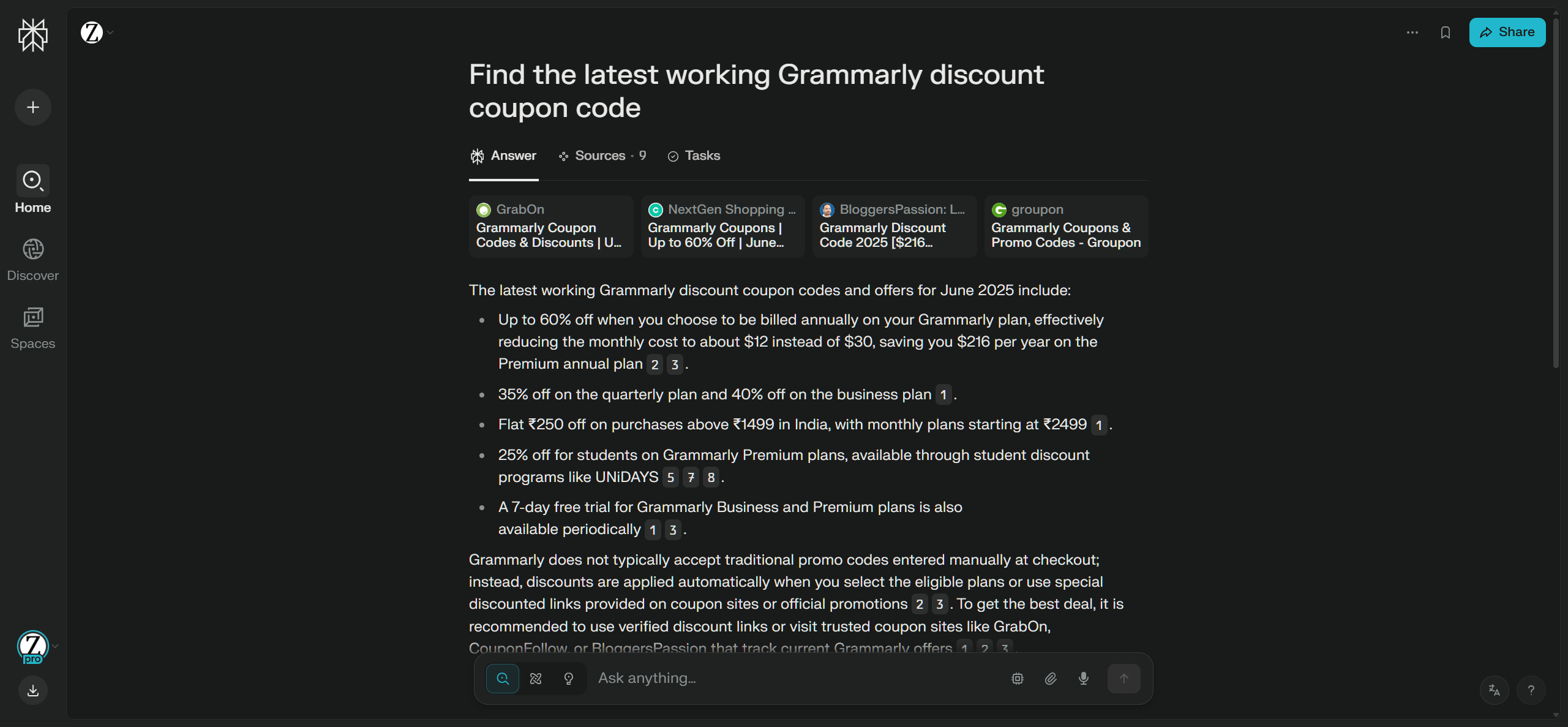
Easy Step-by-Step Method
Step 1: Visit Perplexity.ai
Step 2: Ask for a Coupon Code
- Use this format in the search bar:
Find coupon for [service name]
Example:Find the latest working Grammarly discount coupon code
Step 3: Test the Suggested Codes
- Perplexity will often list multiple coupon codes. Some may work, others might not.
- Copy and paste each into the checkout field on the target website and check the discount.
Step 4: Try Alternative Coupon Tricks (Optional)
- Some users reported success using random terms like
morecashas a coupon code. - If the entered code is invalid, it may trigger another (valid) fallback offer.
Step 5: Bonus Chrome Extensions (Optional)
- Use coupon aggregator extensions to automatically test and apply the best code:
- Honey, Coupert, or similar tools
Step 6: Explore Discounted Subscriptions (Optional)
- Get cheap tool subscriptions (including Perplexity) here:
https://onehack.us/t/tools-shop-hq-semrush-moz-envato-ai-tools-accounts-available-cheap-price/222570
Step 7: Perplexity Referral Offers & Free Plans
-
Refer and get $10 off Pro
Refer a friend and you both get a discount. Give $10, get $10.
https://perplexity.ai/pro?referral_code=0VUFO4EV -
Use this referral link for free trials: https://plex.it/referrals/LAYFFZ01
-
Get 1 year of Perplexity free with a Revolut Premium trial:
https://help.revolut.com/help/profile-and-plan/my-plan-benefits/partnership-benefits/perplexity/
Quick Tips
- Free Perplexity accounts work fine for coupon hunting—no subscription needed.
- Add “valid coupon for [month/year]” in your query to get updated codes.
- Don’t limit yourself to major sites—this works for niche services too.
- Check for seasonal or bulk discounts mentioned directly on the product pages.
Important Notes
- Not all codes will work. It’s trial and error—be patient.
- Avoid buying from resellers using loophole-based plans (e.g., business or edu emails) unless they offer replacement guarantees.
- Always validate site legitimacy before purchasing discounted subscriptions from third parties.
 !
!